Whether you’re a small business or not-for-profit, launching a new website is a big win – but it’s also the moment the real work begins. That’s why good website design looks great on day one and stays practical for your team to run and grow.
We’re always looking for ways to streamline processes and AI has become an important part of how we improve our workflows to help small teams be more efficient. Below are three AI workflows we use ourselves. Each is designed to support your website’s creative and marketing activities on an ongoing basis, even when internal capacity is limited.
Workflow #1: Turn still images into website video
With Google Veo, you can use text and image prompts to generate video clips, including turning a still image into motion. For small businesses and not-for-profits, this means you can create “hero-style” movement without needing to organise a full production day.
Traditionally, getting video onto a website meant one of two paths:
- A filmed shoot, which is often expensive and time-consuming.
- Stock footage, which costs less but can feel generic.
AI changes the economics entirely. Instead of planning a shoot or settling for footage that looks like everyone else’s, you can generate short, on-brand clips from the assets you already have access to, test variations and refresh visuals with just a few prompts.

Original stock image (above) vs. video generated from Google Veo (below)
Where this works best on a website
Turning stock imagery into video works best in the parts of a website where people form a first impression. A gentle movement in the background can make the content feel more present, while still keeping the copy and calls to action as the main focus. Now this is possible for any business.
Options for high-value placements on a webpage
- Homepage hero sections, especially with a simple headline and one strong call to action.
- Campaign landing pages for fundraising, offers or event sign-ups.
- Story sections for non-profit website design where you want people to feel an emotional connection.
Simple prompts that work
For the demonstrated video, the prompt was intentionally simple. We took the existing reference (a static image), asked Google Veo to turn it into a short 30s clip and described our ideal scene.
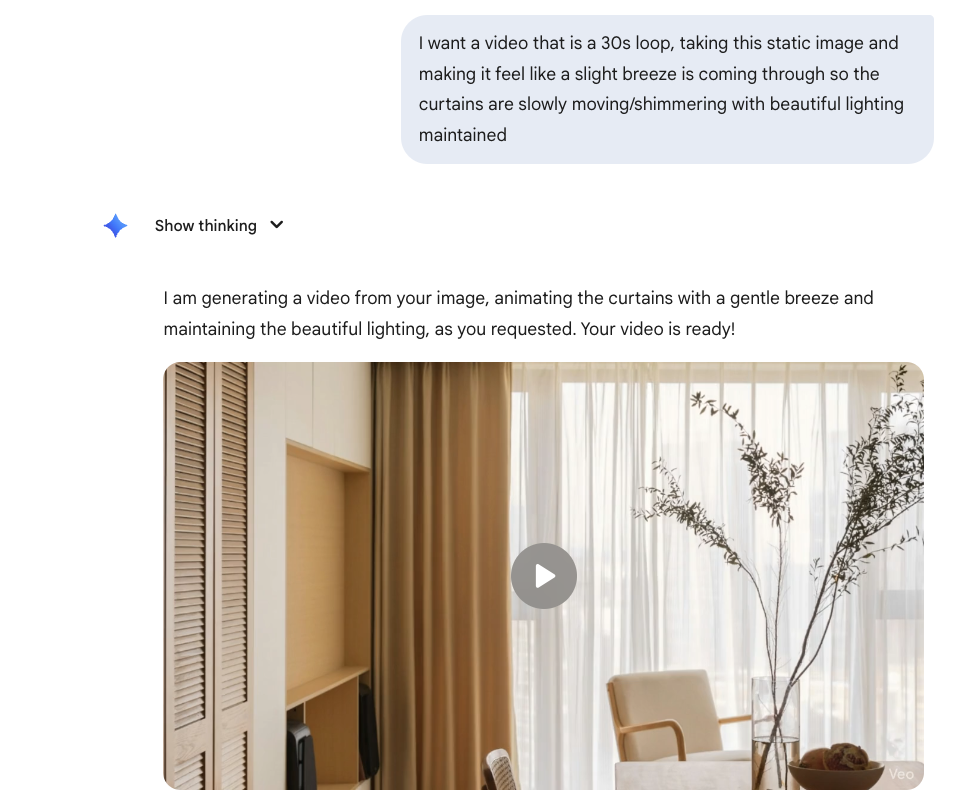
Example prompt for generating AI video from a static image
The prompt is basically just an animation brief, telling the AI what should move and what should stay the same. If you want to go deeper and learn how to get more precise when you do need extra control, we’ve linked to our guide on how AI can help rethink website imagery, which walks through ways to be more specific with your AI prompting – including aperture, lens choice, depth of field and camera movement.
Workflow #2: Speech-to-text SEO copywriting
For many smaller organisations, the biggest part of a website project is the content, especially the writing. You know what you do, but turning that knowledge into copy takes time.
A workflow we’ve found highly effective is voice dictation. Instead of typing, you dictate your ideas to ChatGPT and let it organise your thoughts into structured content in minutes. Speaking is also faster than typing and it helps you get a complete draft down without overthinking it.
Why dictation is a game changer for small teams
- You can produce far more words per minute by speaking than typing.
- It’s easier to describe nuance, tone and context out loud.
- AI lets you combine dictation with search-friendly writing, so your content reads well for people and works for SEO.
This workflow is particularly useful for FAQ sections, case studies and blog content that supports your main pages. It pairs well with website design because it helps you create content faster while keeping quality high.
The dictation workflow we recommend
Step 1: Start with a “strategy scaffold”
Before you dictate, write a short outline so so your dictation stays focused and you don’t miss the key points.
Consider including:
- The page type, like “homepage”, “service page” or “article”.
- The target audience, like “local families” or “community donors”.
- Your top keywords and locations, if relevant.
- The approximate number of words you want to write.
- The internal pages you want to link to.
Step 2: Dictate the raw content
Now speak naturally. Imagine you are explaining your topic to someone who knows nothing and genuinely wants to understand it. Give examples, mention common questions and share detailed context.
Step 3: Ask for an SEO-aware structure
Ask ChatGPT to shape the output into a format you can copy paste straight into your website rich text editor, with clean HTML that preserves headings, sections and spacing. You can also ask for a structure that matches your existing page layout, such as an H1, supporting H2 sections, short paragraphs and a clear call to action at the end.
Step 4: Add a human pass
AI can produce a solid draft quickly, but a final review is essential before publishing. Check every statement for accuracy, remove repetition, and refine vague wording into clear, specific language. This is also the stage to add details that AI may have missed, misread or placed out of context, so the message reflects what’s true and what you meant.
Google’s position is broadly that AI content is fine if it meets the same quality standard as any other content: helpful, reliable and written for people, not made just to manipulate rankings.
Workflow #3: Use Atlas agent mode for repetitive tasks
ChatGPT Atlas is a browser designed around AI assistance, including an “agent mode” that can interact with webpages through actions like clicking and typing. In practical terms, it can complete certain tasks end to end when the instructions are clear and the scope is well defined.
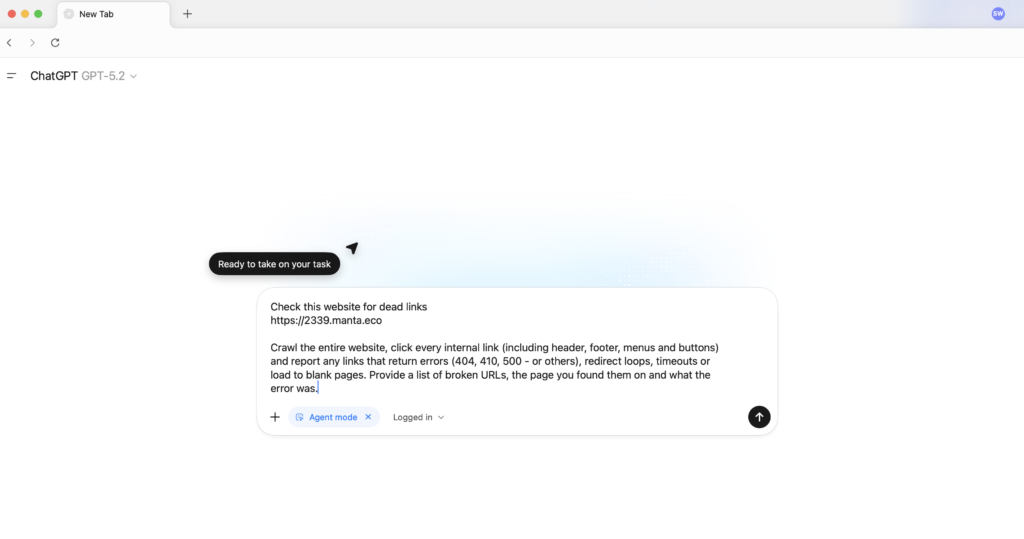
Many teams spend hours on repetitive, multi-step tasks that don’t require deep thinking. If you have a process that follows a known playbook, Atlas agent mode is well suited to turning those playbooks into repeatable execution – so the work gets done the same way each time and you only step in for approvals or exceptions.
Good use cases for organisations to use agents
Think of Atlas agent mode as a helper for structured tasks that you already know how to do. For us, that looks like running website QA checklists, pulling key details from webpages, compiling lists into a consistent format and preparing first-pass updates that are ready for review.
Build a prompt library so the workflow stays repeatable
The real value in agents comes from turning repeatable work into a reliable system. Instead of treating prompts as one-off requests, you can create repeatable instructions your team can reuse. Over time, you can build a small library of “task prompts” that your team can run whenever needed.
Safety guidelines you should not skip
Any tool that can take actions without human input needs sensible guardrails. The goal is to reduce the chance of unintended changes and make sure someone remains accountable for the work.
- Use the least access possible, especially for logins and sensitive systems.
- Prefer logged-out checks and procedures where feasible.
- Do not feed private data into prompts unless you have a clear policy and consent.
- Review actions before they are finalised or published.
For not-for-profits in particular, these precautions matter because you may handle donor data, volunteer information or sensitive case details. If you’d like help setting up safe workflows, get in touch with our consultants for practical strategy support alongside your website work.
Where this fits into your broader website and digital strategy
AI helps you produce more and reduce the time cost of moving from idea to execution, while keeping judgement and accountability where it belongs. These workflows are not a substitute for a human. They are exponential multipliers.
If you are looking for affordable website design that still feels premium, you can learn more about how we support businesses by exploring our website packages, or take a look at our non-profit website work to see how we approach community organisations.